
If you’ve been asking how does IPTV work, you’re in the right place. Most explanations online either drown you in tech terms… or skip the details that actually matter when you’re trying to watch smoothly.
This guide is written for everyday UK viewers. You’ll learn what IPTV is in plain English, what happens when you press “play”, why buffering shows up (especially in the evenings), and how to set things up so it feels effortless.
How Does IPTV Work?
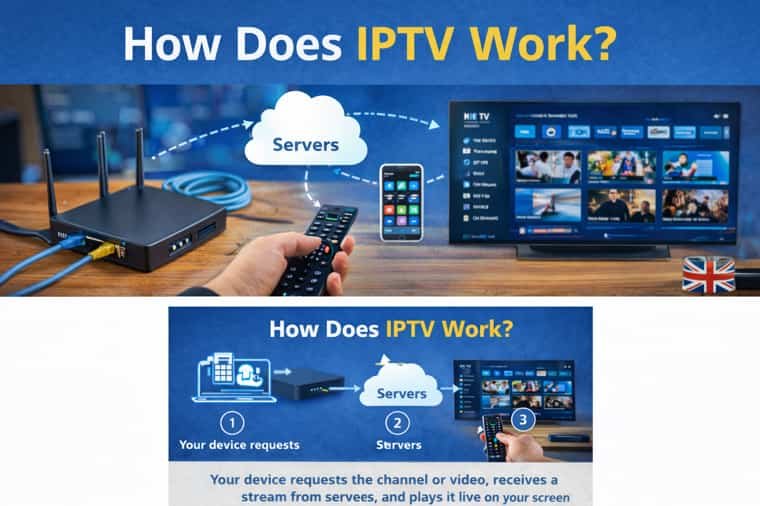
IPTV is simply TV delivered through your internet connection instead of a dish or aerial. You open an app on your Smart TV, Firestick, Android TV box, phone, or set-top box, choose a channel or video, and your device pulls the stream from servers and plays it live. Most services send a separate stream to each viewer (unicast). For smooth viewing, connection stability matters more than raw speed.
Want to test your setup first? Try the Free Trial and see how it runs on your device.
Free Trial
View Packages
Key Takeaways
- IPTV streams TV over the internet instead of broadcast signals.
- Your device requests a stream and plays it in real time.
- Buffering is usually Wi-Fi, device limits, or peak-time congestion.
- “Stable” beats “fast” for day-to-day viewing.
- A few setup changes fix most issues quickly.
How IPTV works in 5 simple steps
- Video is prepared (live channels and on-demand content are encoded for streaming).
- Streams are hosted (on servers, often supported by a CDN).
- Your app requests the stream when you select a channel or video.
- Data arrives in small chunks and the player buffers slightly ahead.
- Your device decodes and plays continuously if data keeps arriving steadily.
That’s the real “engine” behind IPTV: request → receive → decode → play.
What is IPTV, in plain terms?
IPTV stands for Internet Protocol Television. The easiest way to understand it is to compare it with traditional TV:
- Traditional TV: one signal is broadcast to everyone at once
- IPTV: your device asks for what you want, and the stream is delivered to you over the internet
So instead of “tuning into a broadcast”, you’re essentially “pulling a stream”.
IPTV vs normal streaming apps: what’s the difference?
People often think IPTV is the same as Netflix-style streaming. They’re related, but IPTV usually feels more like “TV” because it commonly includes:
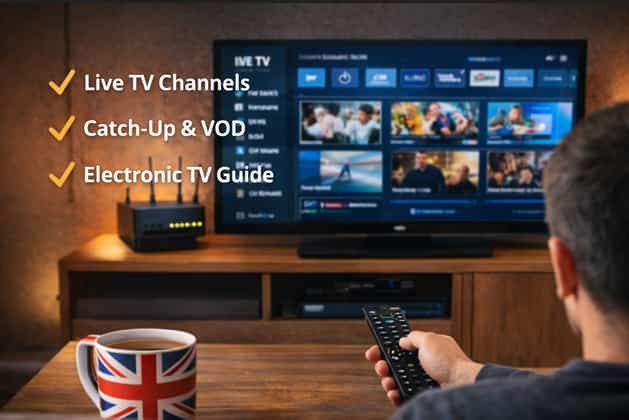
- Live channels (with a channel list)
- EPG (Electronic Program Guide)
- Catch-up (watch earlier programmes)
- VOD (Video On Demand)
Whereas typical streaming services focus mainly on on-demand libraries.
How does IPTV work in the UK (and why evenings feel worse)?
In the UK, performance often changes by time of day because your viewing experience depends on your home network, not just your broadband plan.
Common UK-specific realities:
- Evening peak usage (more devices online at once)
- Wi-Fi congestion in flats/terraces (neighbours’ routers competing)
- Router placement issues (inside cabinets, behind TVs)
- Older devices struggling with high-bitrate streams (especially 4K)
If it runs well in the afternoon but buffers at night, it’s rarely “mystical” it’s usually congestion + Wi-Fi stability.
Unicast vs multicast (quick explanation)
You don’t need to memorize this just know why it matters:
- Unicast: a separate stream is sent to you (most common on public internet)
- Multicast: one stream is shared across many viewers (common in managed/ISP networks)
Most consumer setups behave like unicast, which is why Wi-Fi stability, routing, and device performance matter so much.
What you need to use IPTV (simple checklist)
- Stable broadband
- A device: Smart TV / Firestick / Android TV / phone / tablet / PC
- A compatible player app
- Your subscription access details (login or connection method)
Best device choice (practical)
- Firestick / Android TV box: usually smooth and consistent
- Smart TV apps: convenient, but older TVs can be slow
- Phone/tablet: great for testing, not ideal for long sessions
Why buffering happens (and why speed isn’t the whole story)
Buffering shows up when video data isn’t arriving fast enough to keep playback continuous.
- Most common causes:
- Weak Wi-Fi signal / interference
- Router overloaded (many devices at once)
- Peak-time congestion or messy routing
- Device limitations (storage, overheating, low RAM)
- Player settings / decoder issues
- Temporary server load
The key takeaway:
Even “fast internet” can buffer if the connection isn’t stable.
If you’re troubleshooting right now, the quickest way is to test on your device first.
Start Free Trial
Compare Packages
The 3 mistakes that cause most UK IPTV issues
- Router hidden away (cabinet/behind TV/low shelf)
- Fix: put it in the open, raised, away from thick walls/metal
- Jumping straight to 4K
- Fix: run HD smoothly first, then move up
- Device storage is nearly full
- Fix: clear cache, remove unused apps, reboot
HD vs 4K stability checklist
| Playback | What matters most | Recommendation |
|---|---|---|
| HD | Stable Wi-Fi + decent device | Best starting point |
| 4K | Strong device + extra network headroom | Use after HD is stable |
Quick fixes first (60 seconds)
- Restart the device
- Restart router (unplug 30 seconds)
- Move closer to the router
- Switch to Ethernet if possible
- Try another device on the same Wi-Fi
If one of these fixes it, you’ve already found the bottleneck.
Step-by-step: make IPTV run smoother (the UK-friendly way)
1) Use Ethernet (if you can)
Wired removes Wi-Fi interference. If you watch daily, it’s usually the best upgrade.
2) Choose the right Wi-Fi band
- 5GHz: faster, cleaner, shorter range
- 2.4GHz: longer range, more interference
Close to the router? 5GHz often wins. Far away? 2.4GHz can be steadier.
3) Fix router placement
- Don’t hide it
- Keep it raised
- Avoid thick walls/metal nearby
4) Free up device storage
- Clear cache
- Remove apps you don’t use
- Reboot the device
5) Test a different player (for diagnosis)
Different players handle streams differently. This is a practical test, not a “magic trick”.
Step-by-step: make IPTV run smoother (the UK-friendly way)
1) Use Ethernet (if you can)
Wired removes Wi-Fi interference. If you watch daily, it’s usually the best upgrade.
2) Choose the right Wi-Fi band
- 5GHz: faster, cleaner, shorter range
- 2.4GHz: longer range, more interference
Close to the router? 5GHz often wins. Far away? 2.4GHz can be steadier.
3) Fix router placement
- Don’t hide it
- Keep it raised
- Avoid thick walls/metal nearby
4) Free up device storage
- Clear cache
- Remove apps you don’t use
- Reboot the device
5) Test a different player (for diagnosis)
Different players handle streams differently. This is a practical test, not a “magic trick”.
Recommended defaults (simple and safe)
| Item | Recommended default |
|---|---|
| Connection | Ethernet if possible, otherwise strong 5GHz |
| Router placement | Open area, not behind TV/cabinet |
| Reboots | Weekly, or when issues appear |
| Device storage | Keep 1–2GB free |
| Playback | Start HD; move to 4K only if stable |
| Background apps | Close what you’re not using |
Mini glossary
- EPG: TV guide listing
- VOD: on-demand library
- Catch-up: watch earlier programmes later
- Unicast: stream sent directly to you
- Multicast: one stream shared across many viewers
- CDN: servers that deliver streams faster by being closer to you
How does IPTV work on a Smart TV?
A Smart TV runs an app that requests the stream over your internet and plays it live.
How is IPTV different from satellite?
Satellite broadcasts one signal to everyone. IPTV sends a stream to your device when you ask for it.
Why does IPTV buffer on fast internet?
Because stability matters Wi-Fi quality, router load, and device limits can cause buffering.
Why is it worse at night in the UK?
Peak-time usage increases congestion and Wi-Fi competition. Wired connections help most.
Do I need a VPN for IPTV?
Some use one for privacy or routing, but it can reduce speed. Fix Wi-Fi and device stability first.
What is IPTV and how does it work?
IPTV is TV delivered over the internet. Your device uses an app to request a channel or video, then plays the stream in real time.
Conclusion
So, how does IPTV work? It’s TV delivered through the internet: you select a channel/video, your device requests the stream, and it plays live assuming your network and device can keep up.
If you want the quickest next step, start by testing your device and network first, then choose a plan that fits your viewing habits.
✅ Start Free Trial:/free-trial/
📦 View IPTV Packages:/packages/