
If you’ve been searching for an IPTV service, you’ve probably seen the same promises everywhere: “no buffering,” “big channel lineups,” “4K quality.” The truth is, none of that matters until you test it on your internet, your device, and at the time you actually watch TV.
That’s why the question “Are there any IPTV providers that offer a free trial?” is a smart one. A proper IPTV free trial in the UK helps you check stability, picture quality, and device compatibility before you spend money.
Next step: If you want to test first (recommended), use the trial and compare options before choosing a plan.
How to Use a Free Trial to Choose the Right IPTV Service
Many IPTV providers in the UK offer short trials (for example, 24–48 hours), though availability can vary. A trial gives you a quick window to test day-to-day performance on your own setup. For the fairest results, test during UK peak hours (around 7pm–11pm), on the device you’ll use most (Firestick, Android, or Smart TV), and watch for buffering, stream load time, and menu responsiveness.
How IPTV Free Trials Work in the UK
An IPTV free trial is usually short and practical. It isn’t there to impress you with big claims it’s there to help you see how the service performs on your broadband connection, Wi-Fi, and device in real conditions. Some providers enable trials quickly, while others activate them manually after a basic setup check.
Most trials run for around 24–48 hours, which is normally enough time to test what matters: stream stability, picture quality, audio sync, and how the app behaves during UK peak hours (7pm–11pm). Longer trials do exist, but they’re less common and often depend on the provider’s process and availability.
Trial access is typically provided in one of two ways:
- App login details (often the easiest option for Smart TVs, Fire TV Stick, Android TV, phones, and tablets), or
- A setup link / configuration details for compatible IPTV apps (more flexible, but slightly more technical).
Many people prefer a no-card trial so it can end automatically without billing surprises. Either way, the goal is the same: use the trial to confirm device compatibility, check performance on your home network, and decide whether the plan fits your viewing habits before you commit.
What You Should Test During a Free Trial
A free trial only helps if you test it the same way you’ll actually watch at home. A quick five-minute check in the afternoon won’t show real performance. Use your IPTV free trial to test stream stability, app responsiveness, and device compatibility in real conditions especially during busy hours.
1. Peak-time stability (the real stress test)
Test between 7pm and 11pm UK time, when home broadband networks are busiest. Pay attention to buffering, channel loading time, and whether playback stays smooth across multiple channels. If it performs well at peak time, it’s usually a better sign for day-to-day viewing.
2. Live events performance (only if it matters to you)
If you watch live events, test during a real broadcast window. Live viewing is where weaker services often show delays or frame drops. A good trial should stay smooth and responsive (where live events are available).
3. Your actual device + Wi-Fi setup
Always test on the device you’ll truly use Fire TV Stick, Android TV box, smartphone/tablet, or Smart TV app. The same IPTV trial can feel different across devices because apps, processors, and Wi-Fi strength vary. Also test on your normal Wi-Fi (not mobile data) so you’re judging your real home setup.
4. App usability: menu speed, EPG, and on-demand (where available)
Don’t just test one channel. Check whether the menu feels fast, whether the EPG (TV guide) loads properly, and whether on-demand playback starts smoothly (where available). If the interface lags, the guide fails to load, or VOD takes too long to start, it can become frustrating even if one channel looks fine.
How to Test Your IPTV Free Trial Properly (Quick Checklist)
A free trial is only useful if you test it the way you’ll actually watch at home. This quick checklist helps you measure real-world performance stream stability, device compatibility, and app usability before you choose any plan.
- Run 2 peak-time sessions: test twice between 7pm–11pm UK time (one weekday + one weekend if possible).
- Play 10–15 channels you’d genuinely watch: don’t just scroll open them, let them run, and check load time.
- If live events matter to you, test one during a busy period: check playback smoothness and whether delays or drops appear (availability varies by plan/region).
- Measure channel switching speed: note whether it changes in 1–2 seconds or takes noticeably longer.
- Check the EPG / TV guide (if included): does it load quickly, update properly, and stay readable while you browse?
- Test on-demand playback (where available): start 3–5 titles and try pause, seek/rewind, and subtitles (if you use them).
- Test your actual home network: try the same stream on your normal Wi-Fi, and if possible compare with Ethernet to see if stability improves.
- If buffering happens, track the pattern: is it only at peak time, only on certain categories, or across everything? Patterns usually point to Wi-Fi congestion, device limits, or app settings.
Why Buffering Happens (and How to Diagnose It Fast)
Buffering isn’t always the provider’s fault most playback issues come from one of three areas: your home network, your device/app setup, or the stream delivery side. A free trial is useful because it lets you spot the pattern quickly and decide whether the service fits your setup.
Here’s a simple way to diagnose it:
- If buffering happens on every device (e.g., phone + Fire TV Stick + Smart TV), it may point to the stream source or delivery capacity (though peak-time broadband congestion can also play a role).
- If it works on mobile data but not on home Wi-Fi, the issue is usually your router, Wi-Fi strength, or local network congestion.
- If only certain channels or categories struggle, it can be a sign of high demand at peak time, app compatibility, or stream quality differences (availability can vary by plan and region).
- If the app feels laggy (slow loading, delayed channel switching), it may be your device performance, app version, or settings such as video decoding.
Quick checks you can try during the trial:
Restart your router, switch to 5GHz Wi-Fi (if available), pause background downloads, update your IPTV app, and if possible test Ethernet for a stability comparison. If the same buffering pattern continues after basic checks, treat it as a strong signal to reconsider.
Red Flags During an IPTV UK Free Trial
A trial should feel transparent and predictable. If you notice two or more of these, it’s usually better to move on rather than “hoping it improves.”
- Consistent buffering at UK peak time (7pm–11pm) even after basic network checks.
- Playback failing to start repeatedly, dropping out, or showing frequent playback errors.
- Very slow menus / EPG / guide that makes the service frustrating to use day-to-day.
- Unclear setup steps or support that doesn’t respond when you need help.
- Marketing claims like “zero buffering for everyone” without mentioning real factors (internet speed, Wi-Fi, device limits, and peak-time demand).
A Quick note on IPTV and Legality
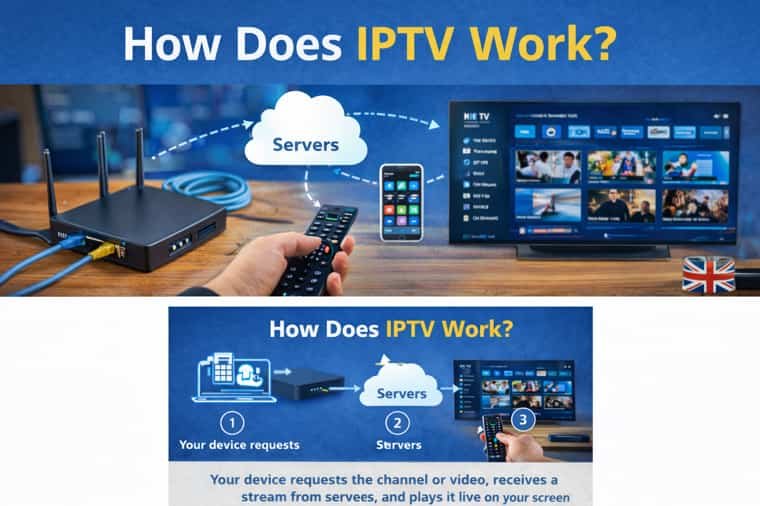
IPTV (Internet Protocol Television) is simply a way to deliver TV and video over the internet instead of satellite or cable. Whether an IPTV service is legal depends on the provider’s licensing, distribution rights, and regional availability and those details can differ from one company to another.
This guide isn’t about “promises” or hype. It focuses on how to evaluate an IPTV free trial in a practical way: streaming stability, device compatibility (Firestick, Android TV, Smart TV), app performance, EPG/TV guide responsiveness, and how playback behaves during peak hours. If a provider is transparent, you should be able to understand what’s included, what varies by region, and what support is available if setup issues come up.
Want to test instead of guessing?
If you’re comparing IPTV providers, the smartest move is simple: run a free trial on your own device, ideally during UK peak hours (7pm–11pm), and judge the service by real performance channel load time, stream stability, and overall user experience.
Are there IPTV providers that offer a free trial in the UK?
Yes. Many IPTV services offer a free trial in the UK so you can check performance before paying. A short trial can still be useful if you test on your own device during peak hours.
How long is a typical IPTV free trial?
Most trials run for 24–48 hours (for example, a free 24 hour IPTV trial or free 48 hour IPTV trial). Some services offer longer trials, but a shorter one is enough if you test properly.
Can I get a free trial on Firestick?
Yes. A free trial on Firestick is common. For a fair test, try it on the same device and Wi-Fi setup you’ll use day-to-day, especially in the evening.
Is there an IPTV free trial for Android?
Yes. You can often test on an Android phone, Android TV, or Android TV box. Performance can vary by device, so test on the exact one you plan to use.
Can I test an IPTV free trial on a Smart TV?
Often, yes. Smart TV support depends on your TV model and the app you use. During the trial, check both playback and EPG/TV guide responsiveness.
Do I need a credit card for an IPTV trial?
Not always. Some services offer a no-credit-card free trial that expires automatically. If payment details are required upfront, read the renewal terms carefully before continuing.
What’s the difference between an app login trial and a setup/configuration trial?
Some trials use a direct app login. Others require entering service details into a supported IPTV app. If you prefer an easier setup, choose the login method when it’s available.
What should I do if the trial buffers at night?
Start by checking your Wi-Fi strength, router load, and device performance. If buffering happens consistently across devices during peak hours, treat it as a sign the service may not be stable on your setup.
Is an instant IPTV free trial always better?
Not necessarily. Quick activation is convenient, but stability, clear setup guidance, and responsive support matter more than speed.
Where should I start if I’m choosing between providers?
Start with a trial and a simple checklist: test during peak time, on your main device, and compare usability (EPG loading, menu speed, stream consistency) before committing.
About Media Giant
Media Giant is a UK-focused IPTV service brand. Our guides are written by a support-led team that works with device setups, trial testing, and common playback issues so the advice is practical and based on real user scenarios, not generic marketing copy.
Helpful links: Home | Free Trial | Compare Packages
Final Step: Run a Trial the Smart way
If you only take one thing from this page, let it be this: test at peak time, test on your real device, and don’t ignore red flags. That one habit saves people the most time, money, and frustration.